> ## Documentation Index
> Fetch the complete documentation index at: https://docs.valyu.ai/llms.txt
> Use this file to discover all available pages before exploring further.
# API Reference
> Valyu API reference documentation. Copy the OpenAPI spec or import it into Postman and other API tools.
Agent note: Valyu's full docs index is at [/llms.txt](https://docs.valyu.ai/llms.txt) (full text at /llms-full.txt); append `.md` to any page URL for Markdown; hosted docs MCP at [https://docs.valyu.ai/mcp](https://docs.valyu.ai/mcp); integration reference at [/AGENTS.md](https://docs.valyu.ai/AGENTS.md).
## OpenAPI Specification
The full Valyu API is described by an OpenAPI 3.0 specification. You can use it to generate client libraries, import into API tools, or explore the API programmatically.
## Import into Postman
You can import the Valyu OpenAPI spec directly into Postman to test all endpoints interactively.
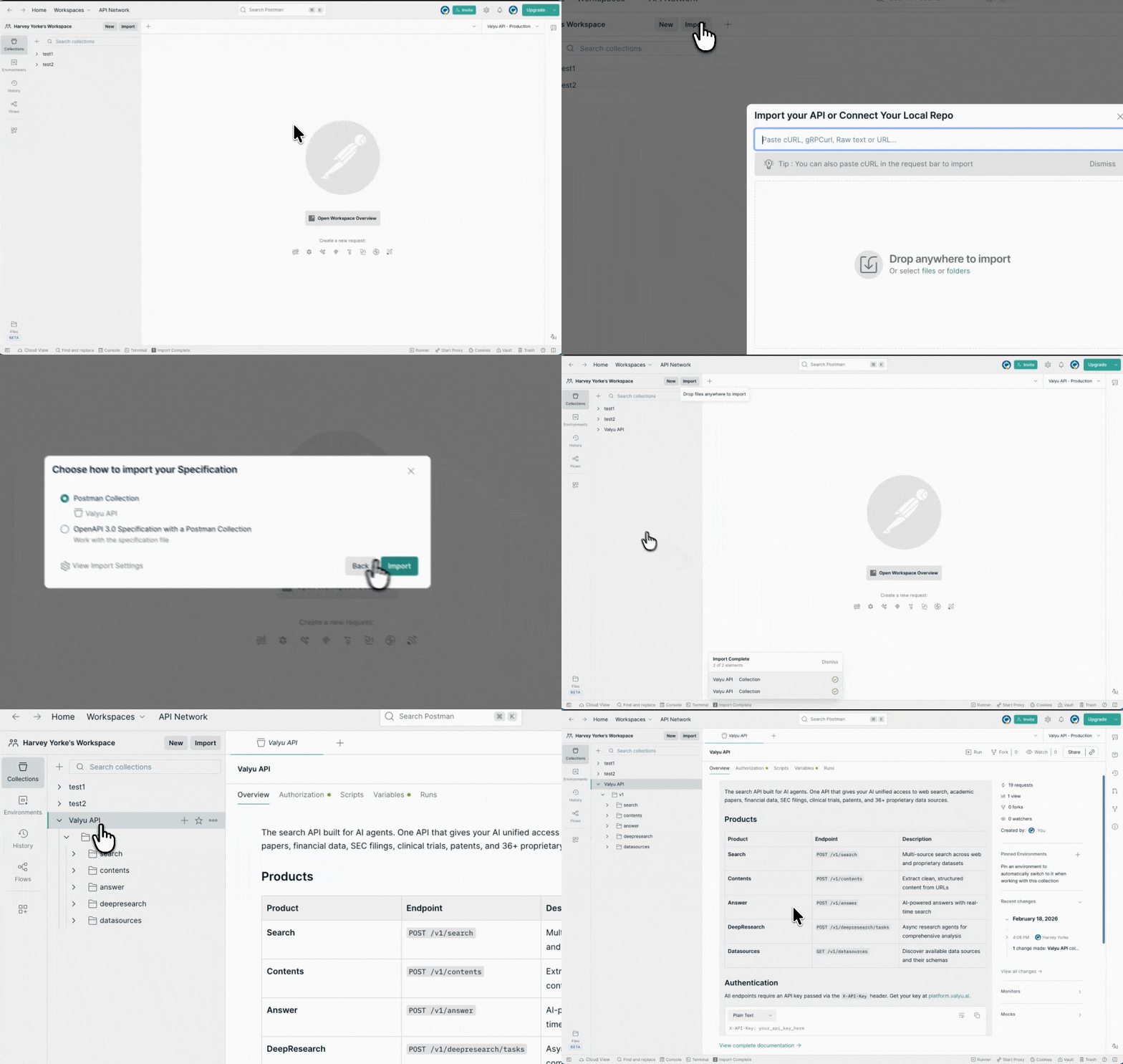 Copy this URL: `https://docs.valyu.ai/api-reference/openapi.json`
In Postman, click **Import** and paste the URL. Postman will generate a complete collection with all Valyu endpoints.
Set the `x-api-key` header to your API key in the collection variables. Valyu authenticates with the `x-api-key` header on every request - not a `Bearer` token.
Every request authenticates with the `x-api-key` header. This also works with other API tools like Insomnia, Bruno, and HTTPie - any tool that supports OpenAPI 3.0 imports can use this spec.
## Built for agents
This reference is machine-readable. Point your coding agent at it directly:
A curated index of every page for LLM consumption. `llms-full.txt` has the full text.
Connect an MCP client to `docs.valyu.ai/mcp` to let your agent search the docs live.
Append `.md` to any page URL for raw Markdown, including the full spec on endpoint pages.
## Endpoints
Search the web, research papers, financial data, and proprietary datasets.
Extract clean, structured content from any URL.
AI-powered answers grounded in real-time search results.
Comprehensive multi-step research with detailed reports.
Templated, versioned DeepResearch for repeatable analyses. Beta
List and explore available data sources.
Copy this URL: `https://docs.valyu.ai/api-reference/openapi.json`
In Postman, click **Import** and paste the URL. Postman will generate a complete collection with all Valyu endpoints.
Set the `x-api-key` header to your API key in the collection variables. Valyu authenticates with the `x-api-key` header on every request - not a `Bearer` token.
Every request authenticates with the `x-api-key` header. This also works with other API tools like Insomnia, Bruno, and HTTPie - any tool that supports OpenAPI 3.0 imports can use this spec.
## Built for agents
This reference is machine-readable. Point your coding agent at it directly:
A curated index of every page for LLM consumption. `llms-full.txt` has the full text.
Connect an MCP client to `docs.valyu.ai/mcp` to let your agent search the docs live.
Append `.md` to any page URL for raw Markdown, including the full spec on endpoint pages.
## Endpoints
Search the web, research papers, financial data, and proprietary datasets.
Extract clean, structured content from any URL.
AI-powered answers grounded in real-time search results.
Comprehensive multi-step research with detailed reports.
Templated, versioned DeepResearch for repeatable analyses. Beta
List and explore available data sources.