> ## Documentation Index
> Fetch the complete documentation index at: https://docs.valyu.ai/llms.txt
> Use this file to discover all available pages before exploring further.
# Wiley Finance
> Licensed finance journals and book chapters, indexed at full text and searchable in natural language.
Peer-reviewed finance research and full textbook chapters, retrievable a passage at a time. Ask in plain English and get back the sections that answer the question, with citations attached.
## How it works
Valyu provides a single **Search API** that lets you search across Wiley's finance content using natural language queries. You send a query, and the API returns relevant passages from Wiley finance papers and books. These results can then be fed directly into an AI model as context for generating answers, analysis, or reports.
```
Your query --> Valyu Search API --> Wiley finance results --> Feed into AI model
```
There is **one API endpoint** to use: the [Search API](/api-reference/endpoint/search) (`POST /v1/search`). You do not need any other endpoints for searching Wiley content.
You can test this in three ways:
1. **No code** - Use the [Search API Playground](https://platform.valyu.ai/playground/search) in your browser
2. **Python** - Use the [Python SDK](/sdk/python-sdk/search) (`pip install valyu`)
3. **JavaScript** - Use the [TypeScript SDK](/sdk/typescript-sdk/search) (`npm install valyu-js`)
4. **Any language** - Call the REST API directly with cURL or any HTTP client
## Available datasets
There are **two** Wiley finance datasets available through Valyu:
| Dataset | Source ID | Size | Content | Updates |
| ------------------------ | ---------------------------- | ---------------- | -------------------------------------------------------------------------------------------------------------------------------------------------------------------------------- | --------- |
| **Wiley Finance Papers** | `wiley/wiley-finance-papers` | 33,000+ articles | Peer-reviewed journal articles from The Journal of Finance, Financial Management, Journal of Financial Research, Journal of Portfolio Management, The Financial Review, and more | Quarterly |
| **Wiley Finance Books** | `wiley/wiley-finance-books` | 4,500+ chapters | Book chapters from titles like Investment Valuation (Damodaran), Options, Futures, and Other Derivatives (Hull), Financial Modeling (Benninga), Valuation (McKinsey & Company) | Quarterly |
You can search one or both datasets in a single query. To search both, include both source IDs.
## What you get
Each search result contains:
| Field | Description |
| ------------------ | ------------------------------------------------------------------------------------------------ |
| `title` | Title of the paper or book chapter |
| `content` | Full-text content (complete article or chapter text, not just abstracts) |
| `url` | URL to the original document (DOI for papers, ISBN for books) |
| `source` | Which dataset the result came from (`wiley/wiley-finance-papers` or `wiley/wiley-finance-books`) |
| `authors` | List of author names |
| `citation` | Generated academic citation |
| `figures` | Extracted figures with captions |
| `image_url` | Map of image filenames to URLs for accessing document images |
| `references` | Reference sections from academic papers |
| `publication_date` | Publication date of the document |
| `citation_count` | Number of times the document has been cited |
## How to test in the playground (no code required)
The fastest way to test Wiley finance content is through the **Search API Playground**. No code or SDK installation is needed.
Go to [platform.valyu.ai/playground/search](https://platform.valyu.ai/playground/search).
You can also open the playground with Wiley datasets pre-selected using this direct link:
```
https://platform.valyu.ai/playground/search?sources=wiley%2Fwiley-finance-books%2Cwiley%2Fwiley-finance-papers
```
If you use the direct link above, the Wiley datasets will already be selected and you can skip to Step 4.
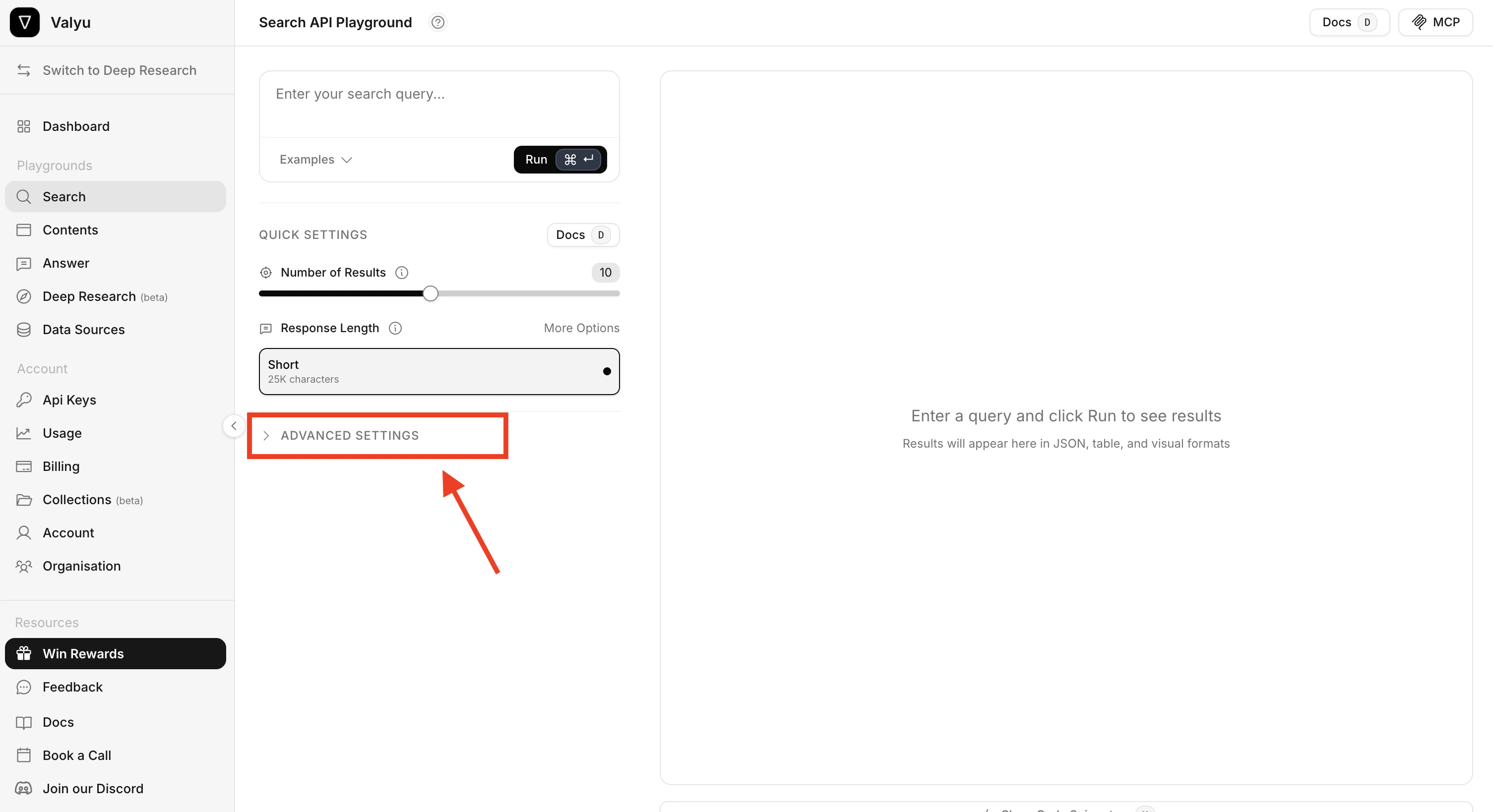
On the left side of the playground, click **Advanced Settings** to expand the settings panel. This is where you select which datasets to search.
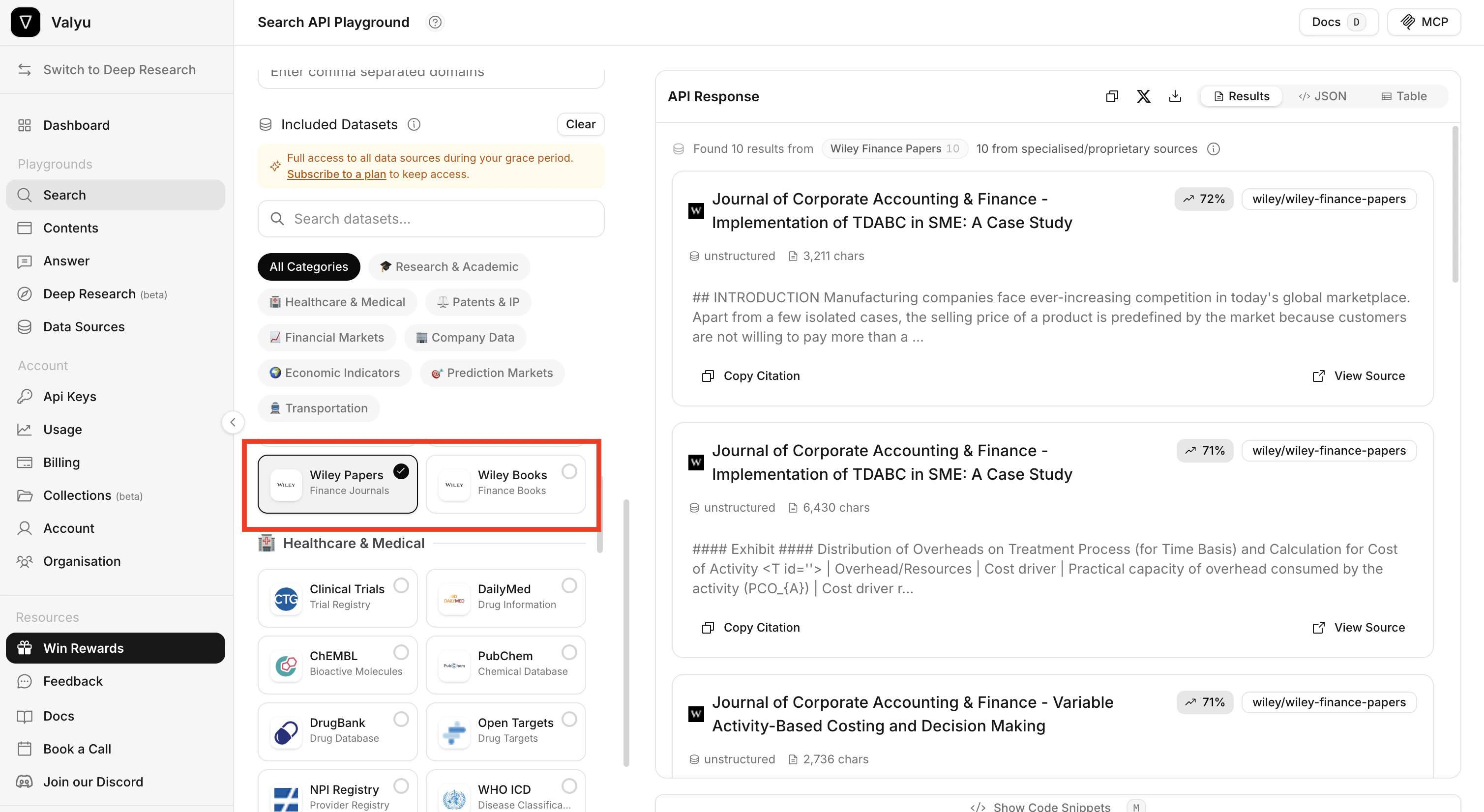
 Click **Included Datasets** at the top of the panel. In the dataset selector, find and select:
* **Wiley Papers** (Finance Journals)
* **Wiley Books** (Finance Books)
Make sure only these two datasets are selected if you want to test Wiley content specifically. You can use the search box to search for "Wiley".
Click **Included Datasets** at the top of the panel. In the dataset selector, find and select:
* **Wiley Papers** (Finance Journals)
* **Wiley Books** (Finance Books)
Make sure only these two datasets are selected if you want to test Wiley content specifically. You can use the search box to search for "Wiley".
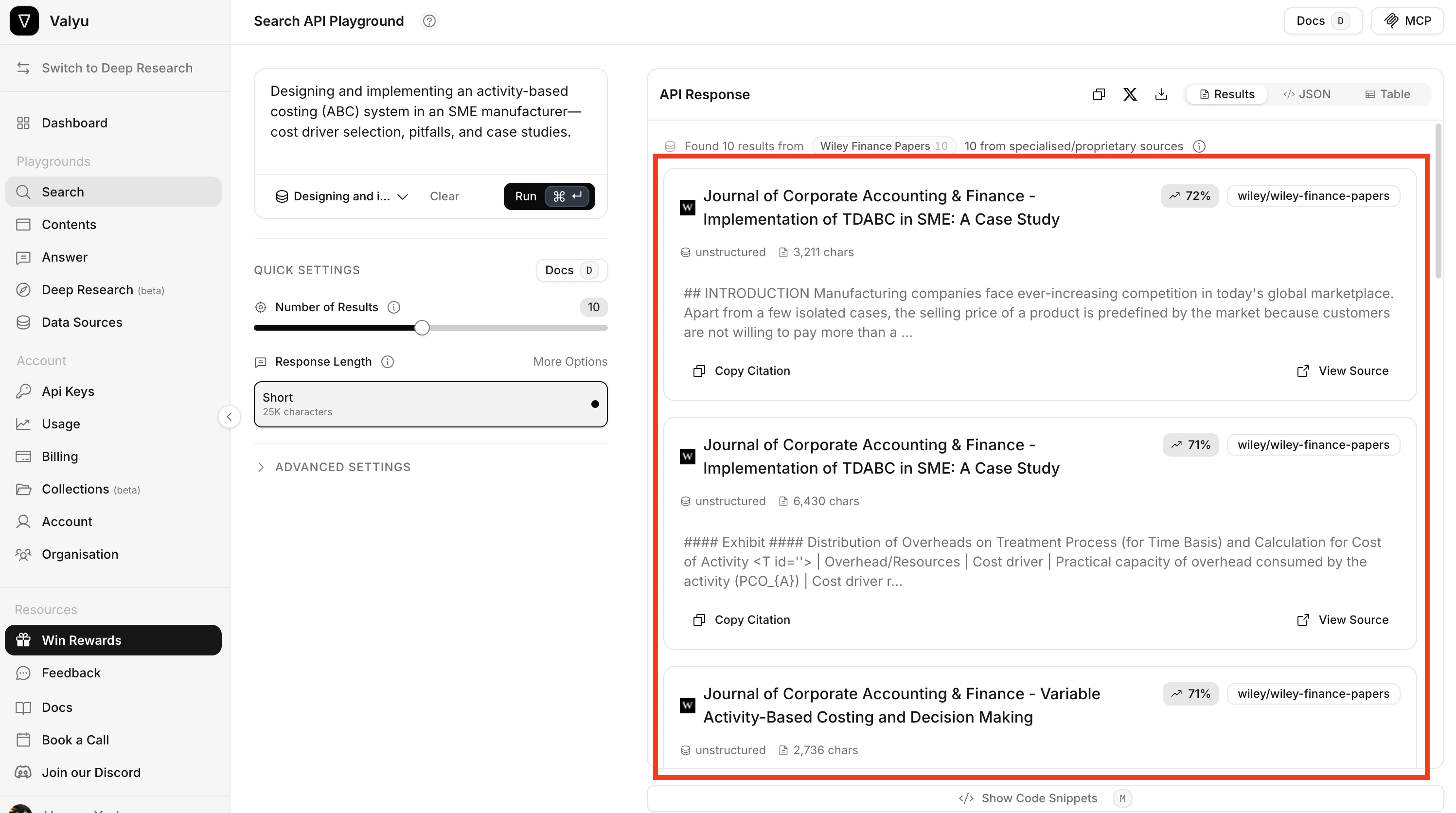
 Type a natural language query in the search box at the top and click **Run**. For example:
```
Designing and implementing an activity-based costing (ABC) system in an SME manufacturer
```
The results appear on the right side. Each result shows:
* The **title** of the paper or book chapter
* A **relevance score** (percentage match)
* The **source** (e.g. `wiley/wiley-finance-papers`)
* A **content preview** of the matched text
* Options to **Copy Citation** and **View Source**
Type a natural language query in the search box at the top and click **Run**. For example:
```
Designing and implementing an activity-based costing (ABC) system in an SME manufacturer
```
The results appear on the right side. Each result shows:
* The **title** of the paper or book chapter
* A **relevance score** (percentage match)
* The **source** (e.g. `wiley/wiley-finance-papers`)
* A **content preview** of the matched text
* Options to **Copy Citation** and **View Source**
 You can switch between **Results**, **JSON**, and **Table** views using the tabs above the results.
## How to use the API directly
The only API endpoint you need for Wiley finance content is the **Search API** (`POST /v1/search`). This is the single endpoint that searches across Wiley papers and books.
### Using cURL
```bash theme={null}
curl -X POST 'https://api.valyu.ai/v1/search' \
-H 'Content-Type: application/json' \
-H 'x-api-key: YOUR_API_KEY' \
-d '{
"query": "derivatives pricing Black-Scholes options valuation",
"included_sources": ["wiley/wiley-finance-papers", "wiley/wiley-finance-books"],
"max_num_results": 10
}'
```
### Key parameters
| Parameter | Value | Description |
| ------------------ | ----------------------------------------------------------------------- | ------------------------------------------------ |
| `query` | Any natural language text | Your search query in plain English |
| `included_sources` | `["wiley/wiley-finance-papers"]` and/or `["wiley/wiley-finance-books"]` | Which Wiley datasets to search. Use one or both. |
| `max_num_results` | `1` to `20` | Number of results to return |
Use `included_sources` to scope the search to the Wiley datasets. Omit it and the search returns results from every dataset you have access to, not just Wiley.
## How to use the Python SDK
```bash theme={null}
pip install valyu
```
```bash theme={null}
export VALYU_API_KEY="your-api-key"
```
```python theme={null}
from valyu import Valyu
valyu = Valyu()
# Search both Wiley finance papers and books
response = valyu.search(
"derivatives pricing Black-Scholes options valuation",
included_sources=[
"wiley/wiley-finance-papers",
"wiley/wiley-finance-books"
],
max_num_results=10
)
for result in response.results:
print(f"Title: {result.title}")
print(f"Source: {result.source}")
print(f"URL: {result.url}")
print(f"Content: {result.content[:500]}...")
print("---")
```
For full Python SDK documentation, see the [Python SDK Search guide](/sdk/python-sdk/search).
## How to use the JavaScript SDK
```bash theme={null}
npm install valyu-js
```
```bash theme={null}
export VALYU_API_KEY="your-api-key"
```
```javascript theme={null}
import { Valyu } from "valyu-js";
const valyu = new Valyu();
// Search both Wiley finance papers and books
const response = await valyu.search(
"derivatives pricing Black-Scholes options valuation",
{
includedSources: [
"wiley/wiley-finance-papers",
"wiley/wiley-finance-books"
],
maxNumResults: 10
}
);
response.results.forEach((result) => {
console.log(`Title: ${result.title}`);
console.log(`Source: ${result.source}`);
console.log(`URL: ${result.url}`);
console.log(`Content: ${result.content.slice(0, 500)}...`);
console.log("---");
});
```
For full JavaScript SDK documentation, see the [TypeScript SDK Search guide](/sdk/typescript-sdk/search).
## Example queries
Below are example queries that work well with Wiley finance content. You can use these in the playground or through the API.
### Finance papers (journal research)
```
"Designing and implementing an activity-based costing (ABC) system in an SME manufacturer - cost driver selection, pitfalls, and case studies."
```
```
"Audit data analytics techniques (e.g., Benford's Law, ratio analysis, regression) applied to revenue recognition fraud - chapters with Excel or R instructions."
```
```
"Real options valuation (binomial or Monte Carlo) for natural resource or R&D projects - comprehensive chapter-length walkthroughs with formulas and examples."
```
### Finance books (textbook content)
```
"Empirical evidence that ESG or climate-risk disclosures lower firms' cost of debt/equity in emerging markets after 2015 (post-Paris Agreement)."
```
```
"High-frequency event studies on how unexpected U.S. monetary policy shocks spill over to Asian equity or FX volatility."
```
```
"Determinants of bank risk-taking and stability when boards have greater gender or ethnic diversity - cross-country panel analyses."
```
### More example queries (both datasets)
```
"portfolio optimization mean-variance efficient frontier"
```
```
"credit default swap pricing counterparty risk"
```
```
"hedge fund alpha generating strategies and performance measurement"
```
```
"fixed income bond duration convexity yield curve"
```
```
"mergers and acquisitions synergy valuation deal structure"
```
```
"financial modeling Excel discounted cash flow valuation"
```
```
"CAPM capital asset pricing model empirical tests"
```
```
"behavioral finance investor sentiment market anomalies"
```
## Use cases
* **Quantitative research** - Access methodologies for derivatives pricing, portfolio optimization, and risk modeling from peer-reviewed journals
* **Investment analysis** - Search textbook content on valuation frameworks, financial modeling, and fundamental analysis
* **Academic literature review** - Find relevant papers across top finance journals for systematic reviews
* **Risk management** - Access chapters on VaR, credit risk, and portfolio risk budgeting from authoritative textbooks
* **Financial modeling** - Reference Excel-based modeling techniques and quantitative methods from Wiley finance books
* **AI model training** - Build finance-specific AI applications with access to high-quality, structured financial content
## API reference
For complete API documentation, see:
* [Search API Reference](/api-reference/endpoint/search) - Full parameter documentation for the Search endpoint
* [Python SDK - Search](/sdk/python-sdk/search) - Python SDK usage guide
* [TypeScript SDK - Search](/sdk/typescript-sdk/search) - TypeScript SDK usage guide
## Relevant links
SEC filings, market data, macro, and compliance sources
The licensed biomedical corpus, with the same retrieval model
arXiv, preprints, and open scholarship
Every dataset, refresh cadence, and access tier
You can switch between **Results**, **JSON**, and **Table** views using the tabs above the results.
## How to use the API directly
The only API endpoint you need for Wiley finance content is the **Search API** (`POST /v1/search`). This is the single endpoint that searches across Wiley papers and books.
### Using cURL
```bash theme={null}
curl -X POST 'https://api.valyu.ai/v1/search' \
-H 'Content-Type: application/json' \
-H 'x-api-key: YOUR_API_KEY' \
-d '{
"query": "derivatives pricing Black-Scholes options valuation",
"included_sources": ["wiley/wiley-finance-papers", "wiley/wiley-finance-books"],
"max_num_results": 10
}'
```
### Key parameters
| Parameter | Value | Description |
| ------------------ | ----------------------------------------------------------------------- | ------------------------------------------------ |
| `query` | Any natural language text | Your search query in plain English |
| `included_sources` | `["wiley/wiley-finance-papers"]` and/or `["wiley/wiley-finance-books"]` | Which Wiley datasets to search. Use one or both. |
| `max_num_results` | `1` to `20` | Number of results to return |
Use `included_sources` to scope the search to the Wiley datasets. Omit it and the search returns results from every dataset you have access to, not just Wiley.
## How to use the Python SDK
```bash theme={null}
pip install valyu
```
```bash theme={null}
export VALYU_API_KEY="your-api-key"
```
```python theme={null}
from valyu import Valyu
valyu = Valyu()
# Search both Wiley finance papers and books
response = valyu.search(
"derivatives pricing Black-Scholes options valuation",
included_sources=[
"wiley/wiley-finance-papers",
"wiley/wiley-finance-books"
],
max_num_results=10
)
for result in response.results:
print(f"Title: {result.title}")
print(f"Source: {result.source}")
print(f"URL: {result.url}")
print(f"Content: {result.content[:500]}...")
print("---")
```
For full Python SDK documentation, see the [Python SDK Search guide](/sdk/python-sdk/search).
## How to use the JavaScript SDK
```bash theme={null}
npm install valyu-js
```
```bash theme={null}
export VALYU_API_KEY="your-api-key"
```
```javascript theme={null}
import { Valyu } from "valyu-js";
const valyu = new Valyu();
// Search both Wiley finance papers and books
const response = await valyu.search(
"derivatives pricing Black-Scholes options valuation",
{
includedSources: [
"wiley/wiley-finance-papers",
"wiley/wiley-finance-books"
],
maxNumResults: 10
}
);
response.results.forEach((result) => {
console.log(`Title: ${result.title}`);
console.log(`Source: ${result.source}`);
console.log(`URL: ${result.url}`);
console.log(`Content: ${result.content.slice(0, 500)}...`);
console.log("---");
});
```
For full JavaScript SDK documentation, see the [TypeScript SDK Search guide](/sdk/typescript-sdk/search).
## Example queries
Below are example queries that work well with Wiley finance content. You can use these in the playground or through the API.
### Finance papers (journal research)
```
"Designing and implementing an activity-based costing (ABC) system in an SME manufacturer - cost driver selection, pitfalls, and case studies."
```
```
"Audit data analytics techniques (e.g., Benford's Law, ratio analysis, regression) applied to revenue recognition fraud - chapters with Excel or R instructions."
```
```
"Real options valuation (binomial or Monte Carlo) for natural resource or R&D projects - comprehensive chapter-length walkthroughs with formulas and examples."
```
### Finance books (textbook content)
```
"Empirical evidence that ESG or climate-risk disclosures lower firms' cost of debt/equity in emerging markets after 2015 (post-Paris Agreement)."
```
```
"High-frequency event studies on how unexpected U.S. monetary policy shocks spill over to Asian equity or FX volatility."
```
```
"Determinants of bank risk-taking and stability when boards have greater gender or ethnic diversity - cross-country panel analyses."
```
### More example queries (both datasets)
```
"portfolio optimization mean-variance efficient frontier"
```
```
"credit default swap pricing counterparty risk"
```
```
"hedge fund alpha generating strategies and performance measurement"
```
```
"fixed income bond duration convexity yield curve"
```
```
"mergers and acquisitions synergy valuation deal structure"
```
```
"financial modeling Excel discounted cash flow valuation"
```
```
"CAPM capital asset pricing model empirical tests"
```
```
"behavioral finance investor sentiment market anomalies"
```
## Use cases
* **Quantitative research** - Access methodologies for derivatives pricing, portfolio optimization, and risk modeling from peer-reviewed journals
* **Investment analysis** - Search textbook content on valuation frameworks, financial modeling, and fundamental analysis
* **Academic literature review** - Find relevant papers across top finance journals for systematic reviews
* **Risk management** - Access chapters on VaR, credit risk, and portfolio risk budgeting from authoritative textbooks
* **Financial modeling** - Reference Excel-based modeling techniques and quantitative methods from Wiley finance books
* **AI model training** - Build finance-specific AI applications with access to high-quality, structured financial content
## API reference
For complete API documentation, see:
* [Search API Reference](/api-reference/endpoint/search) - Full parameter documentation for the Search endpoint
* [Python SDK - Search](/sdk/python-sdk/search) - Python SDK usage guide
* [TypeScript SDK - Search](/sdk/typescript-sdk/search) - TypeScript SDK usage guide
## Relevant links
SEC filings, market data, macro, and compliance sources
The licensed biomedical corpus, with the same retrieval model
arXiv, preprints, and open scholarship
Every dataset, refresh cadence, and access tier