> ## Documentation Index
> Fetch the complete documentation index at: https://docs.valyu.ai/llms.txt
> Use this file to discover all available pages before exploring further.
# Wiley Health & Life Sciences
> Licensed biomedical journals, indexed at full text and searchable in natural language.
Agents can read inside a paper here, not just its abstract. Ask a question in plain English and get back the passages that answer it, with citations attached.
This is a gated dataset. It is licensed content, so access is granted per organisation and is not enabled by default. See [Getting access](#getting-access).
## How it works
```
Your query --> Valyu Search API --> Wiley HLS results --> Feed into AI model
```
One endpoint does it: the [Search API](/api-reference/endpoint/search) (`POST /v1/search`).
## The dataset
| Dataset | Source ID | Size | Coverage | Updates |
| -------------------------------- | ----------------- | --------------- | --------------- | --------- |
| **Wiley Health & Life Sciences** | `wiley/wiley-hls` | 250,000+ papers | 2010 to present | Quarterly |
Peer-reviewed journals spanning medicine, nursing, life sciences, biomedical research, pharmacology, and allied health, across roughly **940 journal titles**. Both proprietary subscription content and open-access content are included, indexed as full text with figures, references, and citations.
### What the corpus covers
Indicative of the major areas, with representative titles:
| Area | Example journals |
| ---------------------------------------- | ---------------------------------------------------------------------------------------------------------------------------------- |
| Nursing and perioperative practice | AORN Journal, Journal of Advanced Nursing, Journal of Clinical Nursing, Nursing in Critical Care |
| Gastroenterology and endoscopy | Digestive Endoscopy, DEN Open, Journal of Gastroenterology and Hepatology, Advances in Digestive Medicine |
| Wound care and dermatology | International Wound Journal, Wound Repair and Regeneration, British Journal of Dermatology, Skin Research and Technology |
| Cancer and haematology | Cancer, American Journal of Hematology, Cancer Medicine |
| Neurology and psychiatry | Alzheimer's & Dementia, Epilepsia, Headache: The Journal of Head and Face Pain, Journal of Neurochemistry |
| Cardiovascular and respiratory | Clinical Cardiology, ESC Heart Failure, Catheterization and Cardiovascular Interventions, Respirology, Pediatric Pulmonology |
| Pharmacology and drug safety | British Journal of Clinical Pharmacology, Clinical Pharmacology & Therapeutics, Pharmacoepidemiology and Drug Safety |
| Devices, biomaterials and bioengineering | Bioengineering & Translational Medicine, International Journal of Biomaterials, Artificial Organs, Journal of Orthopaedic Research |
| Genetics, molecular and cell biology | Journal of Cellular Physiology, Molecular Microbiology, PROTEOMICS, FEBS Letters |
| Public health and evidence synthesis | Journal of Evidence-Based Medicine, Worldviews on Evidence-Based Nursing, Cochrane Evidence Synthesis and Methods |
This is a subset for orientation, not the full list. For the complete title list, or to check whether a specific journal is covered, email [contact@valyu.ai](mailto:contact@valyu.ai).
## Choosing coverage: HLS only or blended
Wiley HLS supports a coverage mode that decides whether a query stays inside the licensed corpus or also draws on the open-access biomedical index in the same call. The parameter is `hls_coverage`.
| Mode | Value | What it does |
| ---------------------- | ---------------------- | ------------------------------------------------------------------------------------------------------------------------------ |
| **HLS only** (default) | `"hls"` | Results come only from `wiley/wiley-hls`. Use when you specifically want licensed content. |
| **OA + HLS** | `"increased_coverage"` | Blends the licensed corpus with open-access biomedical literature in one ranked result set. Use for maximum recall on a topic. |
Same query, both modes, side by side:

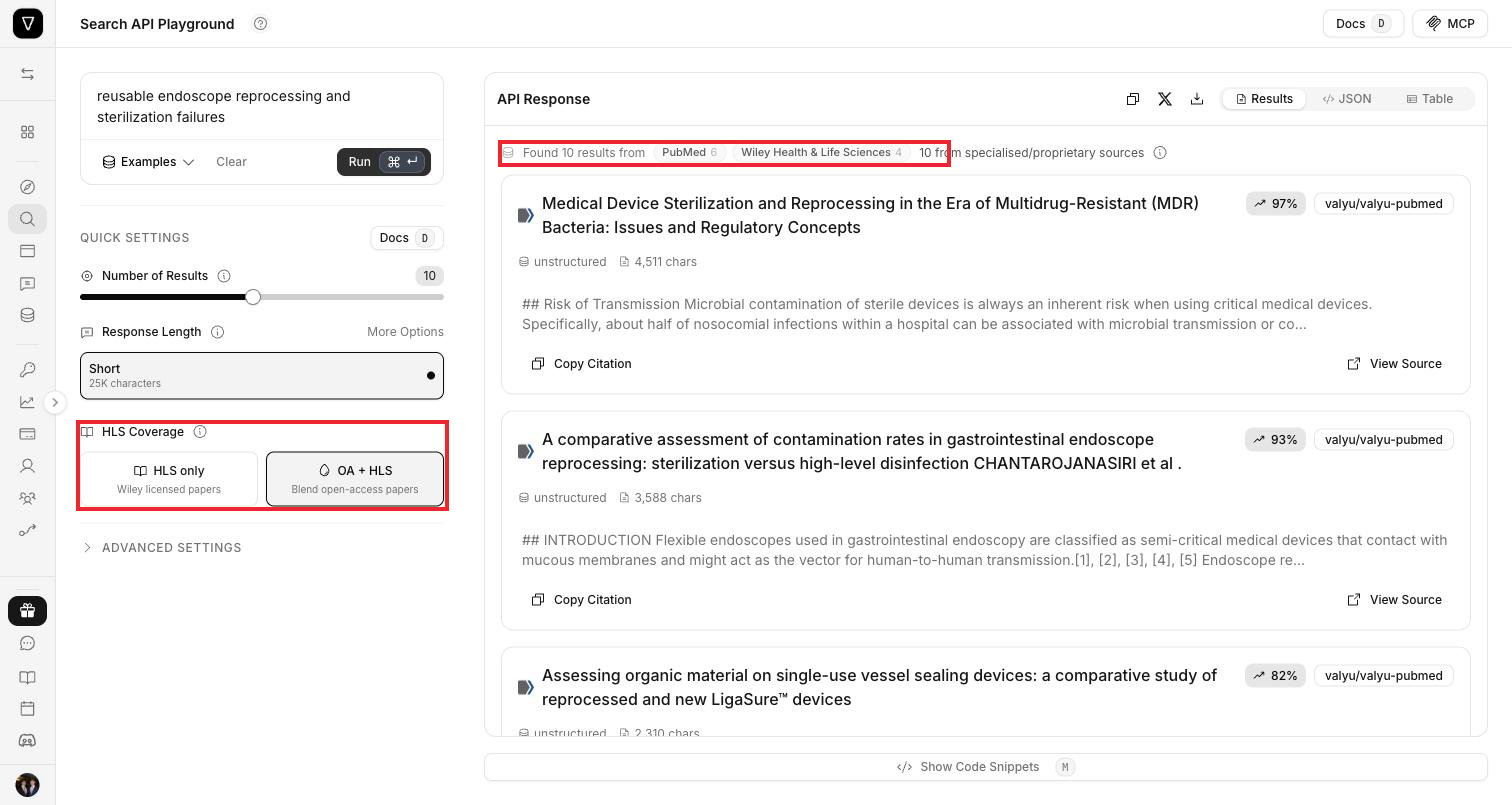 Note the source breakdown at the top of each response. In HLS-only mode all ten results are Wiley. In blended mode the same query returns a mix, and the response labels which dataset each result came from.
Blended mode is usually the better default for broad literature scans, because a narrow topic can exhaust the licensed corpus before it fills your requested result count. Use HLS-only when you need to know that everything you got back is licensed content.
## What you get
Each result contains:
| Field | Description |
| ------------------ | ------------------------------------------------------------------------------------ |
| `title` | Title of the paper |
| `content` | Full-text passages, not just the abstract - the sections most relevant to your query |
| `url` | DOI-resolvable link to the original article |
| `source` | Which dataset the result came from |
| `authors` | List of author names |
| `abstract` | Article abstract |
| `citation` | Preformatted academic citation |
| `references` | Parsed reference list |
| `image_url` | Figures and images from the matched sections |
| `publication_date` | Publication date |
| `doi` | Digital Object Identifier |
| `relevance_score` | Match score for the query |
Structure is preserved in the returned markdown: section headings, tables, and inline reference markers all survive extraction, so a downstream model can cite a specific claim back to its source.
## How to test in the playground (no code required)
Go to [platform.valyu.ai/playground/search](https://platform.valyu.ai/playground/search).
You can open it with Wiley HLS pre-selected using this direct link:
```
https://platform.valyu.ai/playground/search?sources=wiley%2Fwiley-hls
```
Under **Quick Settings**, use the **HLS Coverage** control to choose between **HLS only** and **OA + HLS**. This maps directly to the `hls_coverage` parameter described above.
Type a natural language query and click **Run**. For example:
```
reusable endoscope reprocessing and sterilization failures
```
Results appear on the right. Each one shows the title, a relevance score, the source dataset, and a content preview, with options to **Copy Citation** and **View Source**. Switch between **Results**, **JSON**, and **Table** views using the tabs above.
Click **Show Code Snippets** at the bottom to get a ready-to-run request for your chosen settings.
## How to use the API directly
### Using cURL
```bash theme={null}
curl -X POST 'https://api.valyu.ai/v1/search' \
-H 'Content-Type: application/json' \
-H 'x-api-key: YOUR_API_KEY' \
-d '{
"query": "reusable endoscope reprocessing and sterilization failures",
"included_sources": ["wiley/wiley-hls"],
"hls_coverage": "increased_coverage",
"max_num_results": 10
}'
```
### Key parameters
| Parameter | Value | Description |
| ------------------ | --------------------------------- | ---------------------------------------------------------------- |
| `query` | Any natural language text | Your search query in plain English |
| `included_sources` | `["wiley/wiley-hls"]` | Scopes the search to the Wiley HLS corpus |
| `hls_coverage` | `"hls"` or `"increased_coverage"` | Licensed only, or blended with open access. Defaults to `"hls"`. |
| `max_num_results` | `1` to `20` | Number of results to return |
**`hls_coverage` is currently REST-only.** The Python and TypeScript SDKs do not yet accept it, so call the endpoint directly if you need blended coverage. Everything else on this page works through the SDKs as normal.
## How to use the Python SDK
```bash theme={null}
pip install valyu
```
```bash theme={null}
export VALYU_API_KEY="your-api-key"
```
```python theme={null}
from valyu import Valyu
valyu = Valyu()
response = valyu.search(
"reusable endoscope reprocessing and sterilization failures",
included_sources=["wiley/wiley-hls"],
max_num_results=10
)
for result in response.results:
print(f"Title: {result.title}")
print(f"Source: {result.source}")
print(f"URL: {result.url}")
print(f"Content: {result.content[:500]}...")
print("---")
```
For full Python SDK documentation, see the [Python SDK Search guide](/sdk/python-sdk/search).
## How to use the JavaScript SDK
```bash theme={null}
npm install valyu-js
```
```bash theme={null}
export VALYU_API_KEY="your-api-key"
```
```javascript theme={null}
import { Valyu } from "valyu-js";
const valyu = new Valyu();
const response = await valyu.search(
"reusable endoscope reprocessing and sterilization failures",
{
includedSources: ["wiley/wiley-hls"],
maxNumResults: 10
}
);
response.results.forEach((result) => {
console.log(`Title: ${result.title}`);
console.log(`Source: ${result.source}`);
console.log(`URL: ${result.url}`);
console.log(`Content: ${result.content.slice(0, 500)}...`);
console.log("---");
});
```
For full JavaScript SDK documentation, see the [TypeScript SDK Search guide](/sdk/typescript-sdk/search).
## Example queries
These work well against the HLS corpus. Use them in the playground or through the API.
### Clinical evidence and systematic reviews
```
"Recent systematic reviews and meta-analyses on surgical site infection prevention - triclosan-coated sutures, wound protectors, and perioperative care bundles, with effect sizes."
```
```
"Negative pressure wound therapy on closed surgical incisions - randomised trials reporting infection, dehiscence, and length of stay."
```
### Device performance and safety
```
"Reprocessing failures and contamination in reusable flexible endoscopes - surveillance culture studies, failure modes, and outbreak reports."
```
```
"Single-use versus reusable endoscopes - comparative infection rates, cost-effectiveness thresholds, and environmental impact."
```
### Methodology and surveillance
```
"Signal detection methods for medical device post-market surveillance of spontaneous adverse event reports."
```
## Getting access
Wiley HLS is a licensed corpus, so access is granted per organisation rather than being on by default.
Request access from the datasets page in the platform. Startups can apply through the startup programme.
Email [contact@valyu.ai](mailto:contact@valyu.ai) for the full journal list, volume pricing, or enterprise terms.
## API reference
* [Search API Reference](/api-reference/endpoint/search) - full parameter documentation
* [Python SDK - Search](/sdk/python-sdk/search)
* [TypeScript SDK - Search](/sdk/typescript-sdk/search)
## Relevant links
PubMed, clinical trials, ChEMBL, and FDA data
The licensed finance corpus, same retrieval model
Every dataset, refresh cadence, and access tier
Run multi-step research over this corpus
Note the source breakdown at the top of each response. In HLS-only mode all ten results are Wiley. In blended mode the same query returns a mix, and the response labels which dataset each result came from.
Blended mode is usually the better default for broad literature scans, because a narrow topic can exhaust the licensed corpus before it fills your requested result count. Use HLS-only when you need to know that everything you got back is licensed content.
## What you get
Each result contains:
| Field | Description |
| ------------------ | ------------------------------------------------------------------------------------ |
| `title` | Title of the paper |
| `content` | Full-text passages, not just the abstract - the sections most relevant to your query |
| `url` | DOI-resolvable link to the original article |
| `source` | Which dataset the result came from |
| `authors` | List of author names |
| `abstract` | Article abstract |
| `citation` | Preformatted academic citation |
| `references` | Parsed reference list |
| `image_url` | Figures and images from the matched sections |
| `publication_date` | Publication date |
| `doi` | Digital Object Identifier |
| `relevance_score` | Match score for the query |
Structure is preserved in the returned markdown: section headings, tables, and inline reference markers all survive extraction, so a downstream model can cite a specific claim back to its source.
## How to test in the playground (no code required)
Go to [platform.valyu.ai/playground/search](https://platform.valyu.ai/playground/search).
You can open it with Wiley HLS pre-selected using this direct link:
```
https://platform.valyu.ai/playground/search?sources=wiley%2Fwiley-hls
```
Under **Quick Settings**, use the **HLS Coverage** control to choose between **HLS only** and **OA + HLS**. This maps directly to the `hls_coverage` parameter described above.
Type a natural language query and click **Run**. For example:
```
reusable endoscope reprocessing and sterilization failures
```
Results appear on the right. Each one shows the title, a relevance score, the source dataset, and a content preview, with options to **Copy Citation** and **View Source**. Switch between **Results**, **JSON**, and **Table** views using the tabs above.
Click **Show Code Snippets** at the bottom to get a ready-to-run request for your chosen settings.
## How to use the API directly
### Using cURL
```bash theme={null}
curl -X POST 'https://api.valyu.ai/v1/search' \
-H 'Content-Type: application/json' \
-H 'x-api-key: YOUR_API_KEY' \
-d '{
"query": "reusable endoscope reprocessing and sterilization failures",
"included_sources": ["wiley/wiley-hls"],
"hls_coverage": "increased_coverage",
"max_num_results": 10
}'
```
### Key parameters
| Parameter | Value | Description |
| ------------------ | --------------------------------- | ---------------------------------------------------------------- |
| `query` | Any natural language text | Your search query in plain English |
| `included_sources` | `["wiley/wiley-hls"]` | Scopes the search to the Wiley HLS corpus |
| `hls_coverage` | `"hls"` or `"increased_coverage"` | Licensed only, or blended with open access. Defaults to `"hls"`. |
| `max_num_results` | `1` to `20` | Number of results to return |
**`hls_coverage` is currently REST-only.** The Python and TypeScript SDKs do not yet accept it, so call the endpoint directly if you need blended coverage. Everything else on this page works through the SDKs as normal.
## How to use the Python SDK
```bash theme={null}
pip install valyu
```
```bash theme={null}
export VALYU_API_KEY="your-api-key"
```
```python theme={null}
from valyu import Valyu
valyu = Valyu()
response = valyu.search(
"reusable endoscope reprocessing and sterilization failures",
included_sources=["wiley/wiley-hls"],
max_num_results=10
)
for result in response.results:
print(f"Title: {result.title}")
print(f"Source: {result.source}")
print(f"URL: {result.url}")
print(f"Content: {result.content[:500]}...")
print("---")
```
For full Python SDK documentation, see the [Python SDK Search guide](/sdk/python-sdk/search).
## How to use the JavaScript SDK
```bash theme={null}
npm install valyu-js
```
```bash theme={null}
export VALYU_API_KEY="your-api-key"
```
```javascript theme={null}
import { Valyu } from "valyu-js";
const valyu = new Valyu();
const response = await valyu.search(
"reusable endoscope reprocessing and sterilization failures",
{
includedSources: ["wiley/wiley-hls"],
maxNumResults: 10
}
);
response.results.forEach((result) => {
console.log(`Title: ${result.title}`);
console.log(`Source: ${result.source}`);
console.log(`URL: ${result.url}`);
console.log(`Content: ${result.content.slice(0, 500)}...`);
console.log("---");
});
```
For full JavaScript SDK documentation, see the [TypeScript SDK Search guide](/sdk/typescript-sdk/search).
## Example queries
These work well against the HLS corpus. Use them in the playground or through the API.
### Clinical evidence and systematic reviews
```
"Recent systematic reviews and meta-analyses on surgical site infection prevention - triclosan-coated sutures, wound protectors, and perioperative care bundles, with effect sizes."
```
```
"Negative pressure wound therapy on closed surgical incisions - randomised trials reporting infection, dehiscence, and length of stay."
```
### Device performance and safety
```
"Reprocessing failures and contamination in reusable flexible endoscopes - surveillance culture studies, failure modes, and outbreak reports."
```
```
"Single-use versus reusable endoscopes - comparative infection rates, cost-effectiveness thresholds, and environmental impact."
```
### Methodology and surveillance
```
"Signal detection methods for medical device post-market surveillance of spontaneous adverse event reports."
```
## Getting access
Wiley HLS is a licensed corpus, so access is granted per organisation rather than being on by default.
Request access from the datasets page in the platform. Startups can apply through the startup programme.
Email [contact@valyu.ai](mailto:contact@valyu.ai) for the full journal list, volume pricing, or enterprise terms.
## API reference
* [Search API Reference](/api-reference/endpoint/search) - full parameter documentation
* [Python SDK - Search](/sdk/python-sdk/search)
* [TypeScript SDK - Search](/sdk/typescript-sdk/search)
## Relevant links
PubMed, clinical trials, ChEMBL, and FDA data
The licensed finance corpus, same retrieval model
Every dataset, refresh cadence, and access tier
Run multi-step research over this corpus